
How to Successfully Advertise “Grey” Verticals and Pass Moderation with Ease: A Cloaking.House Review
Working with grey verticals involves constant interaction with moderation and searching for effective solutions to simplify traffic flow. Many webmasters choose traffic cloaking as it helps bypass frequent Google and Facebook policy updates and reduces the risk of account bans.
Today, we’ll explore one of the most effective traffic cloaking tools – Cloaking.House. This service has gained popularity due to its reliability and high efficiency. Why do top industry professionals choose it? Find out in our latest review!
Functionality Overview
Cloaking.House combines ease of use with flexible functionality. Setting up cloaking takes just a few minutes with minimal effort. Thanks to AI-powered tools, the service effectively protects traffic from moderators, spy services, and competitors.
Cloaking.House processes over 5 million clicks daily, allowing its AI-driven tools to continuously refine algorithms and enhance performance.
Key Advantages:
- API Integration Support – enables convenient filtering setup and process automation.
- Flexible Filtering Options – filter traffic by country, device, OS, browser, VPN/Proxy, IPv6, ISP, Referrer, and new features like language-based cloaking, allowing content adaptation for different regions and audiences.
- Easy Integration – implement cloaking via PHP code or a cloaked link.
- Four Pricing Plans – including the newly added corporate plan, specifically designed for companies looking to integrate cloaking functionality directly into their products.
Tool Overview in Practice
Getting started with Cloaking.House is simple—just complete a quick registration. After filling in all the necessary details and agreeing to the terms of use, you’ll receive 7 days of free access to the tools—a great bonus to kickstart your experience.
The developers have carefully considered every detail. On the homepage, you’ll find a video tutorial that clearly explains the functionality and setup process.
Getting Started with the Service
Once all the preparatory steps are completed, you can proceed directly to working with Cloaking.House. To set up your first cloaking flow, go to the "Flows" tab and click "Create Flow".
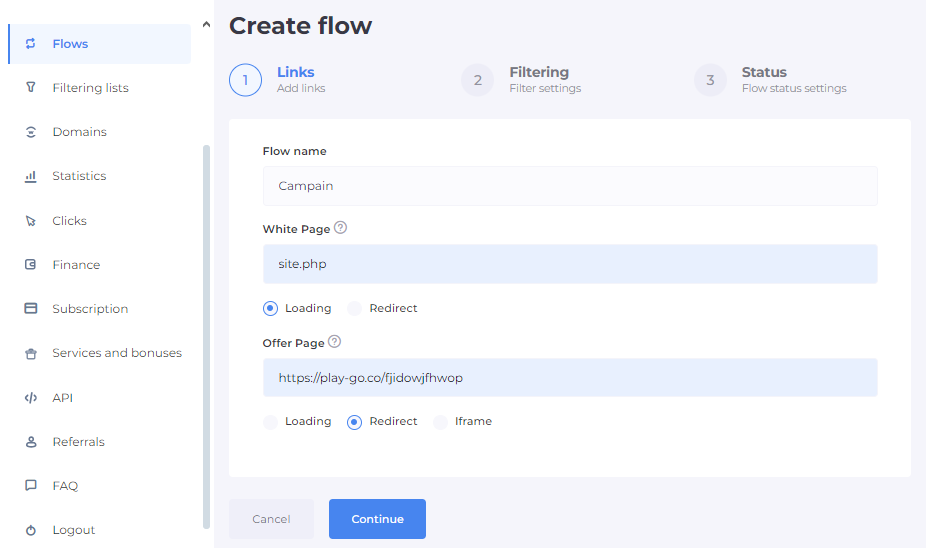
The next step is to choose the integration method that suits you best. There are two options available: PHP file or cloaked link. Let's take a closer look at each of them.
PHP File
If you choose the PHP file option, the next step is to enter its name. You can set any name you prefer, as long as it is clear and convenient for you.
The next step is setting up the White Page. This is the page that will be displayed to moderators, bots, and filtered users. You can create it yourself or use special generators. If you use PHP integration, the White Page is hosted on the same server as the cloaking setup.
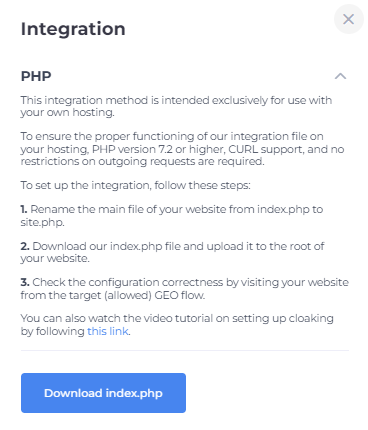
Please note that the index file of this page must be renamed to site.php, keeping the same extension. This integration method is intended for use on your own hosting. To ensure the integration file works correctly, your server must have PHP version 7.2 or later installed.
The next step is the Offer Page. This is the page your target users will see. Here, you need to add a link to a landing page, a pre-lander, or an affiliate link. An important detail: if the Offer Page is hosted on a server, you must choose the loading method, whereas if it's an affiliate link, you should use the redirect method.
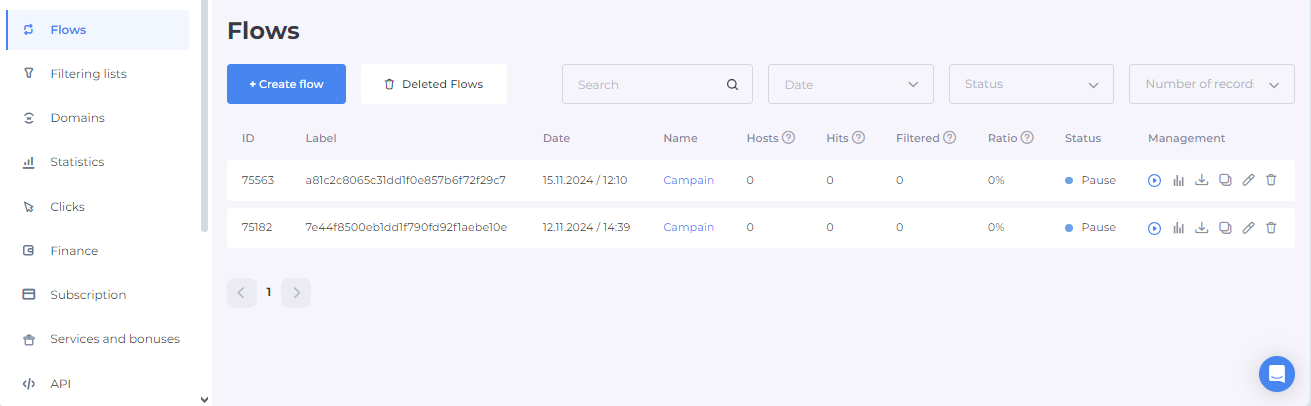
After completing the setup, go to the "Flows" tab and open the "Management" section. Click on the downward arrow icon to access a detailed instruction. Next, download the index.php file and place it in the root directory of your website using a file manager.
Cloaked Link
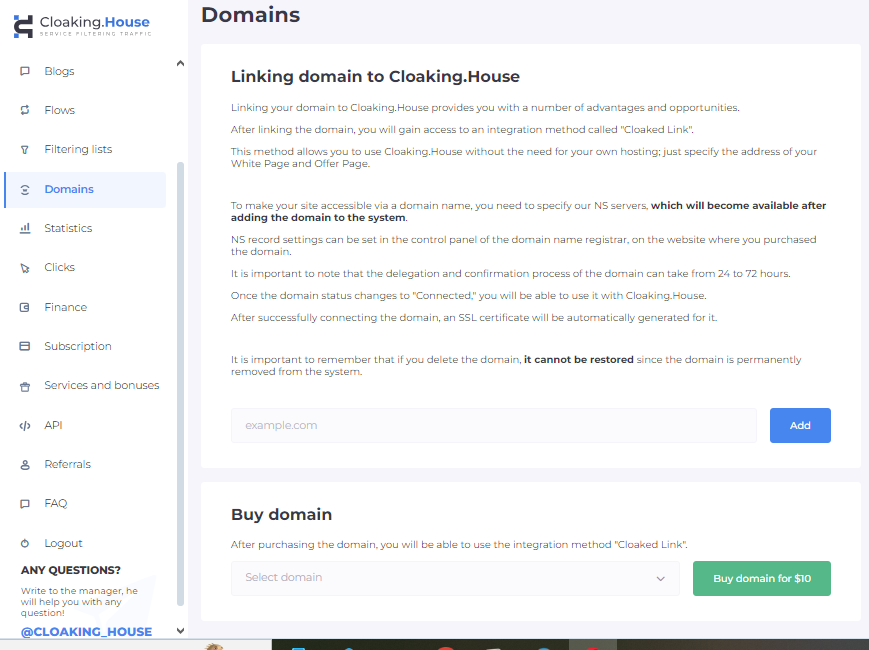
To use this method, you first need to link your domain to Cloaking.House. Add the required website to the "Domains" tab and then configure the NS server according to the instructions.
Cloaked Link Integration
Once the domain is linked, the option to integrate via a cloaked link will appear in the Stream Management section. The process is as follows:
- Select the linked domain.
- Generate a link for traffic redirection.
Domain
To add a domain to the tool, navigate to the relevant tab and enter your website address. Additionally, you have the option to purchase a ready-made domain by topping up your account balance. The cost is $10.
Once added, your domain will appear in the "My Domains" tab. From there, copy the NS servers and add them to your domain settings on the registrar's website. The verification process can take between 24 to 72 hours.
Filter Settings
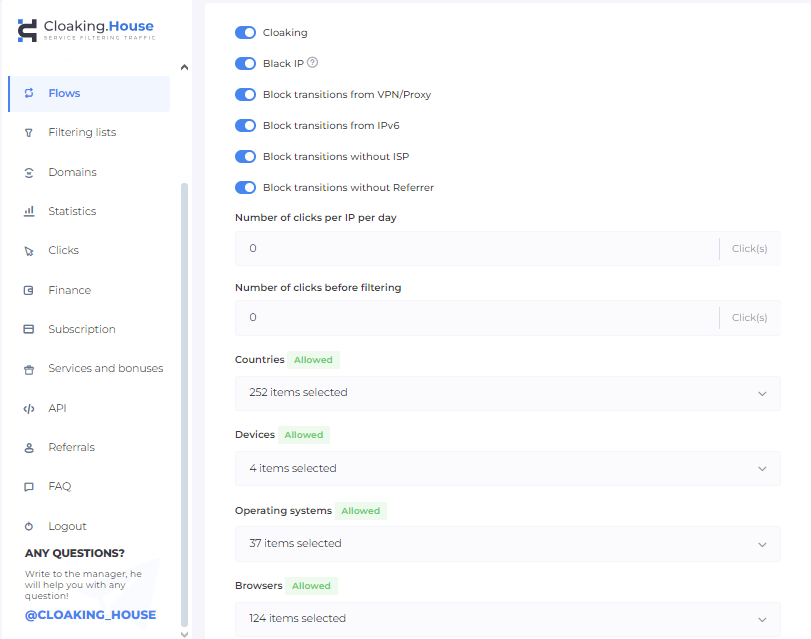
The next crucial step is configuring filters to ensure effective cloaking. Filters determine how traffic is distributed between the White Page and Offer Page, optimizing user flow and reducing the risk of blocking.
Detailed Service Configuration
- VPN/Proxy Filtering: Blocks visitors using VPNs or proxies by redirecting them to the White Page, as such users are not typical for targeted traffic.
- IPv6 Filtering: Most bots and moderators use IPv6, so this traffic is automatically redirected to the White Page.
- Users Without ISP Filtering: If the system cannot detect an internet provider, this traffic is redirected to the White Page for additional protection.
- Referrer Filtering: Visitors coming via direct links won’t see your Offer Page, as moderators often access sites without a referrer.
- IP Click Limit per Day: You can set a limit on the number of visits from a single IP, after which the user will be redirected to the White Page.
- Click Limit Before Activation: Defines the number of clicks before cloaking activates, allowing for traffic testing.
- Black IP Filter: Automatically blocks IPs flagged for suspicious activity (bots, moderators).
- Black List Filter: Triggers when specific rules (IP, User-Agent, provider) are met, redirecting traffic to the White Page.
- White List Filter: Allows only selected IPs to always see the Offer Page, useful for traffic testing.
- IP Click Limit per Day Filter: Activates when the set limit for visits from a single IP is exceeded, redirecting users to the White Page.
- Client Filter: The user sees the Offer Page only if they meet all predefined filtering criteria.
- Language Filter: Cloaking.House introduced a unique filter that tracks and sorts clicks based on the user's browser language. This tool enables precise language-based targeting on users' PCs, helping to avoid unwanted clicks. The new feature allows for better geographic targeting.
- Cloaking Filter: Blocks bots and moderators when key parameters such as country or provider cannot be determined, redirecting them to the White Page.
Stream Status
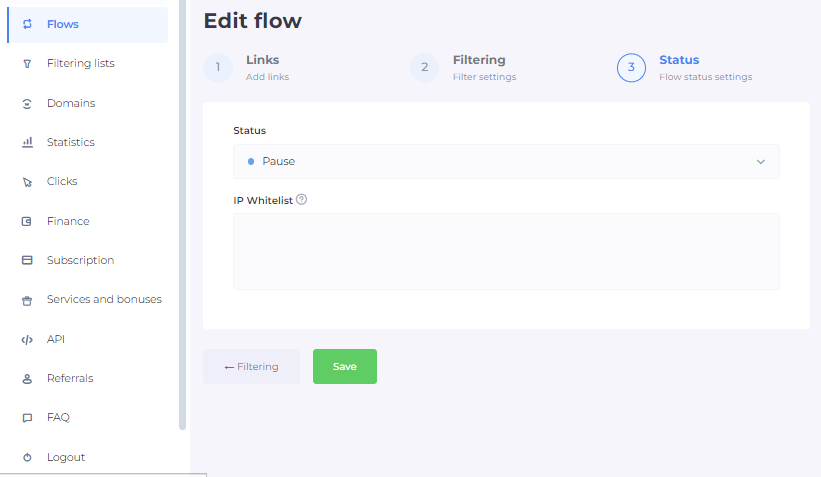
After configuring the filters, you need to activate the stream status. If necessary, you can add a whitelist of IP addresses, which will be displayed in your personal account after saving.
Let's see how the flow appeared!
Statistics
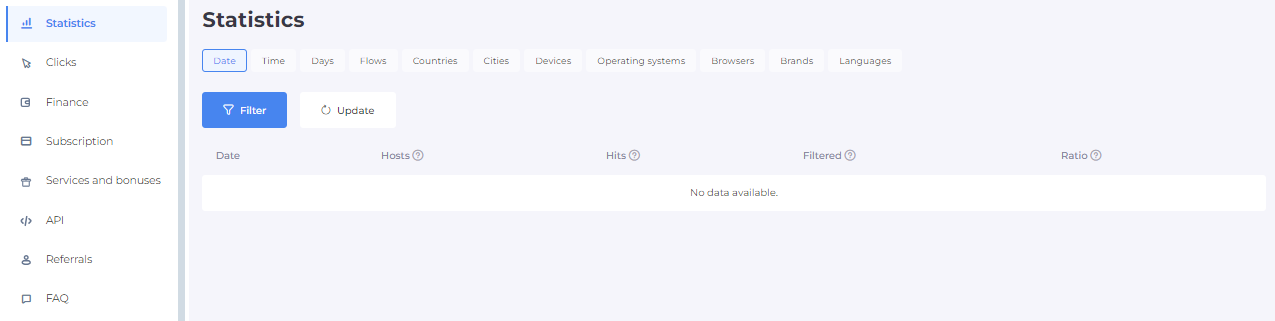
All current figures can be found in the corresponding tab, they are updated every 60 seconds.
Information Sorting
You can sort the data by date, time, days of the week, streams, countries, cities, devices, operating systems, browsers, and brands. For each of these criteria, the corresponding stream parameters are displayed.
- Hosts – unique requests or visits from a single IP address.
- Hits – the total number of requests or visits.
- Filtered – requests and visits that passed the set filters.
- Ratio – the proportion of filtered requests and visits to hits.
Clicks
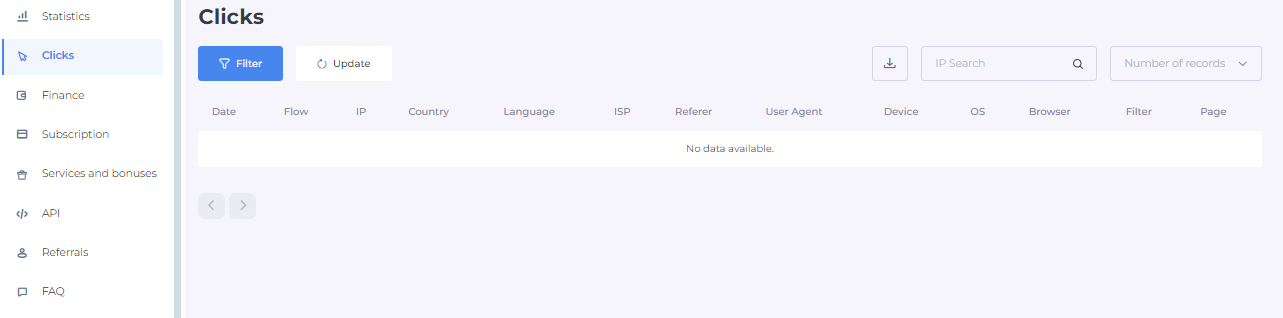
This section provides a detailed analysis of all clicks. You can filter statistics by the following parameters: date, stream, IP address, country, language, ISP, referrer, User Agent, device, operating system, browser, and filters. Additionally, you can search for specific IP addresses, adjust data filtering, and export reports for further analysis.
Support
The quality of support is worth highlighting separately. The managers have extensive experience in this field and respond quickly to all inquiries. If you have any questions about the service, you can contact them in a convenient way:
- Telegram Chat – fast assistance with any issues.
- Personal Manager – every client with an active subscription gets a dedicated specialist for setup and technical support.
- In-Service Chat – a convenient communication channel directly on the platform.
Cloaking.House ensures all the conditions for a seamless user experience!
Replenishment and rates
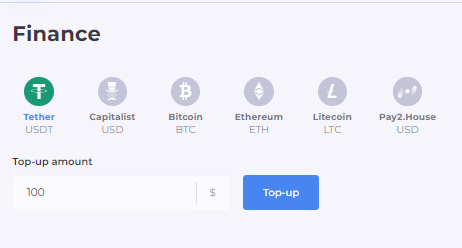
The platform has a large selection of ways to replenish your account. You can do this in the "Finance" section using the following methods:
BTC;
ETH;
USDT;
LTC;
Perfect Money USD.
Visa 4x4 USD
Payment and Subscription Plans
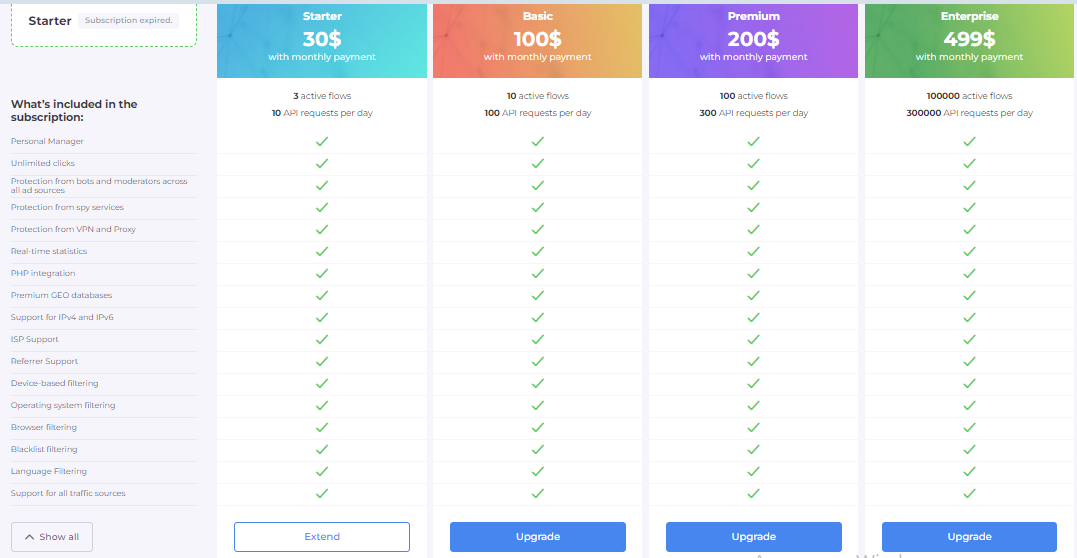
To pay for the service, go to the "Subscription" tab and choose a plan – you can pay either monthly or annually. Click "Select" for the first payment or "Renew" if you need to extend your subscription.
There are four available plans. Let's review each one:
Starter Plan
- Price: $30/month or $240/year
- Who is it for? Ideal for small projects or startups needing a reliable solution to bypass moderation without high costs.
- Includes:
- Assistance and support from a personal manager
- Unlimited clicks
- A full set of tools for protection against bots, spy services, VPNs, and proxies
- Real-time updated statistics and access to premium GEO databases
Basic Plan
- Price: $100/month or $600/year
- Who is it for? Best for companies working with moderate traffic who prioritize security and stability.
- Includes:
- Everything in the Starter Plan
- Support for IPv4 and IPv6
- Expanded filters for device types, operating systems, browsers, and referrers
- Advanced traffic segmentation features
Premium Plan
- Price: $200/month or $1200/year
- Who is it for? A top-tier option for large businesses and aggressive marketing campaigns with high moderation challenges.
- Includes:
- Everything in the Basic Plan
- ISP support for more precise traffic provider management
- Advanced mechanisms for handling all traffic sources, including referrer filtering
Corporate Plan
- Price: $499/month or $2988/year
- Who is it for? The best choice for large enterprises requiring maximum protection and flexibility when working with high traffic volumes.
- Includes:
- Everything in the Premium Plan
- Priority support and a dedicated manager
- Full access to all data sources and deep traffic analytics tools
- 300,000 API requests per day
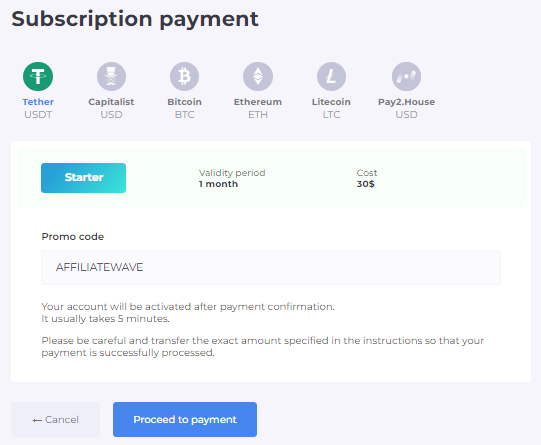
And a pleasant bonus! Cloaking.House has prepared a special promo code for our readers: AFFILIATEWAVE. Use it to get a 30% discount on any plan.
Instead of Conclusions
Cloaking.House is a top-tier service that significantly simplifies the work of webmasters, agencies, and media buyers. One of the key advantages of the platform is its continuous system updates based on user feedback.
Another important benefit is that you don’t need to spend a lot of time learning the settings or have programming knowledge. Even beginners can easily integrate Cloaking.House.
Visit Cloaking.House, sign up, and purchase a plan with a 30% discount using the promo code AFFILIATEWAVE. Don’t limit yourself in leads and traffic sources, even when working with gray verticals!






1 reviews on "How to Successfully Advertise “Grey” Verticals and Pass Moderation with Ease: A Cloaking.House Review"
Joey Konopelski