Clickaine performance case: achieving 75%+ ROI with adult smartlink popunder traffic across 12 GEOs
I decided to test Clickaine’s popunder traffic using an adult smartlink from the CPA.house affiliate network. I had zero prior data or experience in these GEOs — this was a completely fresh traffic experiment.
Within just five days, the campaign reached break-even and quickly moved into positive ROI. After 20 days of optimization and scaling, total profit was nearly twice the initial ad spend.
Here’s a breakdown of how the campaign developed and what made it profitable.
Case summary:
- Ad format: Popunder
- Ad network: Clickaine
- Affiliate network: CPA.house
- Offer: Adult Smartlink
- GEOs: US, UK, DE, CA, AU, AT, CH, NL, BE, NO, FI, DK
- Run period: September 5–24, 2025
- Devices: Mobile only
- OS: Android 10+
- Spend: $862
- Revenue: $1,512
- Profit: $650
- Average ROI: +75.48%
- Top GEOs: US, UK, CA, DE
- CPM: from $0.20 → up to $0.40 after optimization
H2 Why I chose these GEOs and an adult smartlink
To be honest, the GEO selection wasn’t some deep strategic masterplan.
I picked an adult smartlink from CPA.house because I wanted something flexible. Smartlinks make testing easier — especially when you’re not sure how the traffic will behave. Instead of locking into one offer, you let the system optimize based on user behavior. For a fresh traffic source, that just made sense.
As for the GEOs — USA, UK, Germany, Canada, plus several other European countries — they were recommended directly by CPA.house as priority markets for this particular smartlink. These are mature markets with solid buying power and stable performance in the adult niche. That matters, especially when you're testing popunder traffic, where monetization depends heavily on how well the audience converts at scale.
Since I had no previous data for these regions on Clickaine, I decided to rely on the affiliate network’s insights rather than guessing. The goal wasn’t to overcomplicate things — it was to start with markets that already had a track record of converting well and see how the traffic behaved.
It was a calculated experiment, not a random shot.
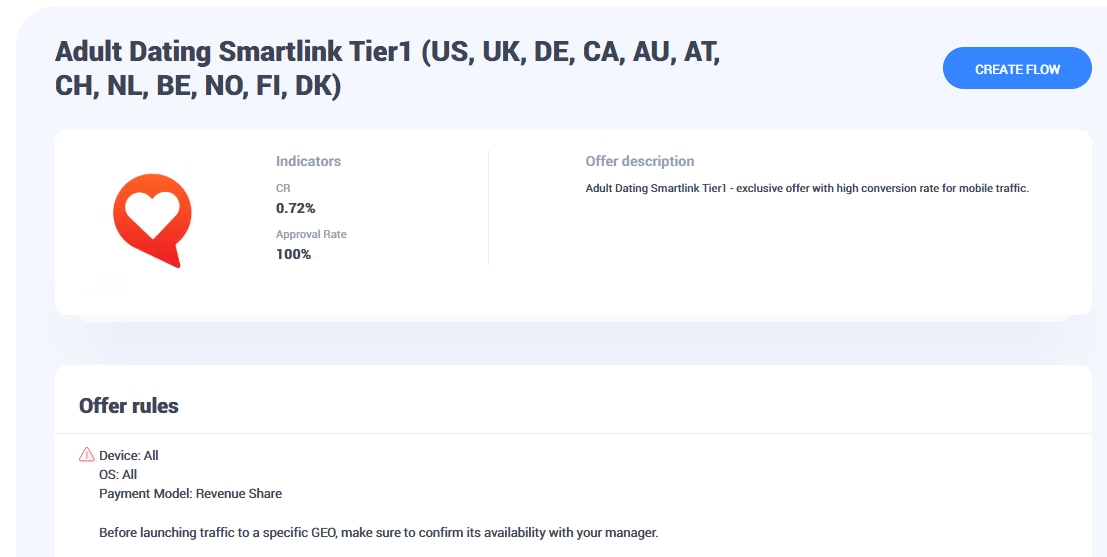
Offer card in CPA.house: “Adult Dating Smartlink Tier 1” — 0.72% CR, 100% approval rate, compatible with all devices and operating systems.
How to get a smartlink in CPA.house
Before launching a campaign, you need to create a flow and obtain a unique link for traffic.
Step 1: Setting up the flow and selecting landings
I created a flow named “campaign1”, specified the traffic source as Clickaine, then selected a landing page (the main page with a 0.72% CR) and saved the settings.
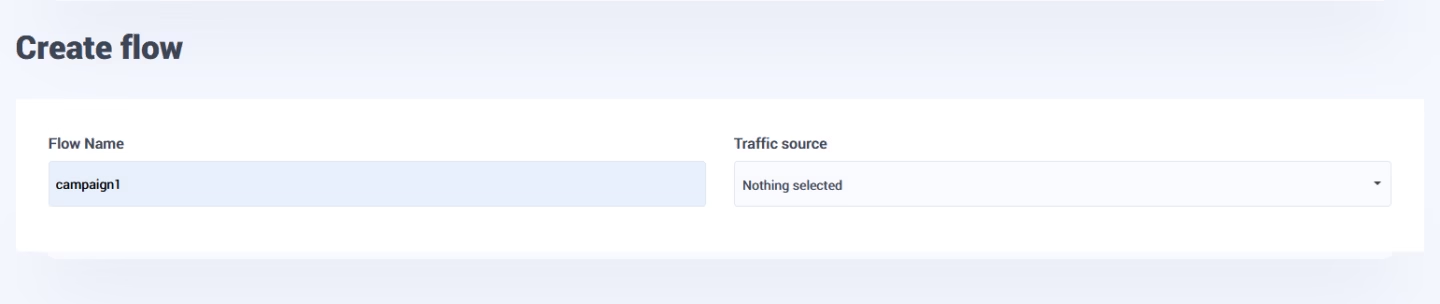
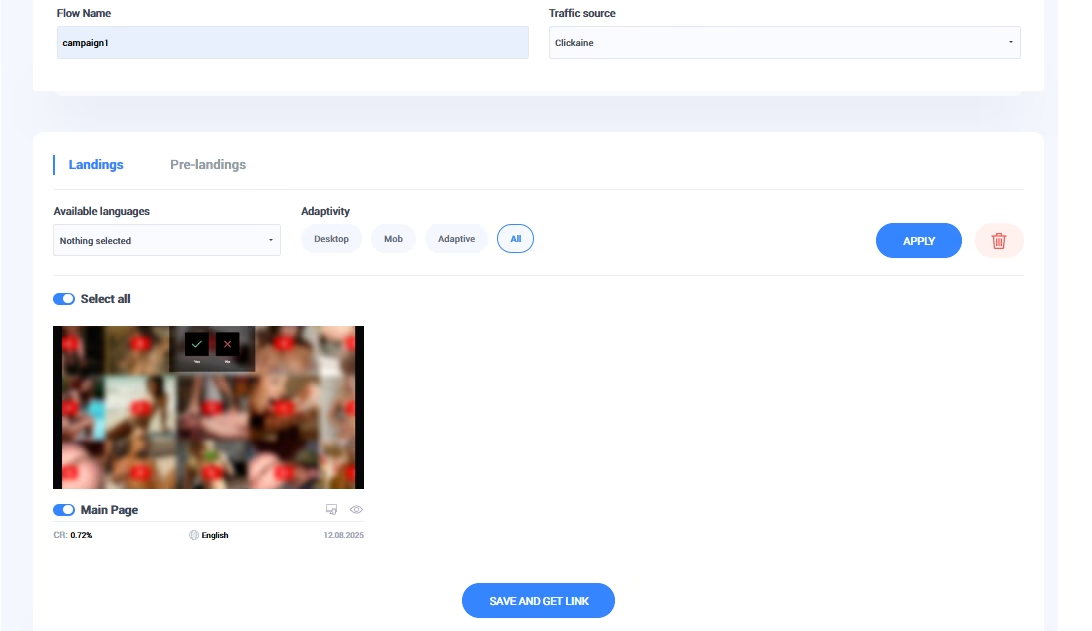
Flow setup in CPA.house: all available landings were enabled, and Clickaine was selected as the designated traffic source.
Step 2: Generate the smartlink with tracking tokens
Once the flow was saved, CPA.house automatically generated a unique smartlink with embedded tracking tokens.
These tokens are important because they pass traffic data back into the affiliate system — allowing you to see which sources, placements, and segments are converting.
I simply copied the generated link and prepared it for integration into the Clickaine dashboard, where it would be used as the campaign’s final destination URL.
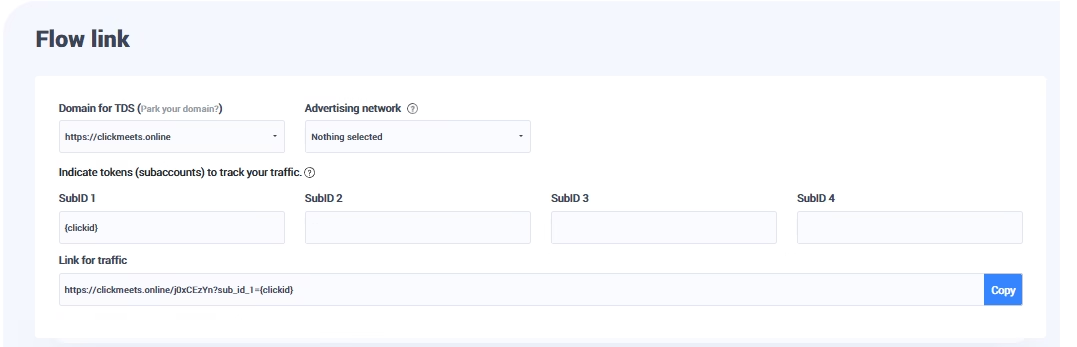
Generated CPA.house flow link using the domain clickmeets.online, with the {clickid} token passed into SubID1 to ensure precise traffic tracking.
- Postback URL: configured to send data to CPA.house.
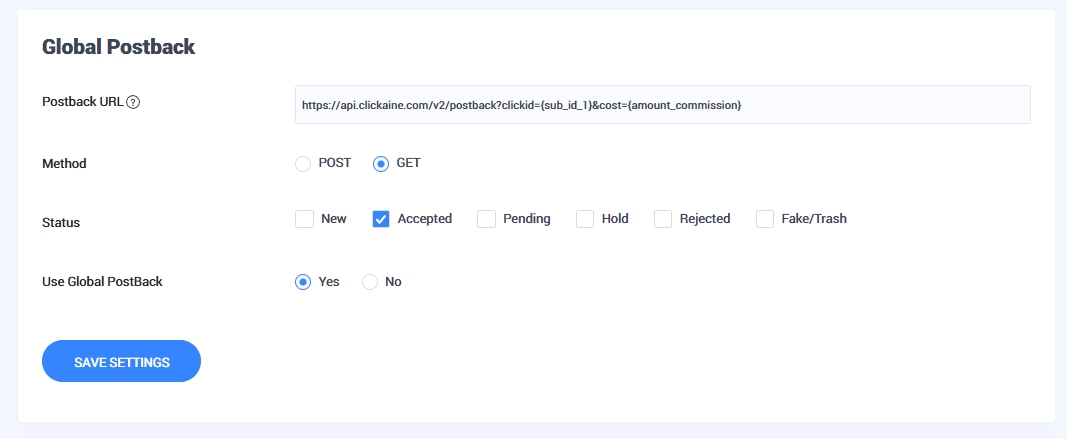
Additionally, I configured a Global Postback inside the CPA.house dashboard to ensure accurate conversion tracking.
How to add the smartlink in Clickaine
Once the smartlink was ready, the next step was setting everything up inside the Clickaine dashboard.
Step 3: Create a creative in Clickaine
I went to Creatives → Add Creative and started a new setup.
First, I selected the Popunder format, since that was the traffic type I wanted to test. Then I chose the appropriate content category — Adult, to make sure the campaign settings matched the offer.
Finally, I pasted the smartlink generated in CPA.house into the destination URL field and saved the creative.
At this point, everything was ready to move on to campaign configuration and traffic testing.
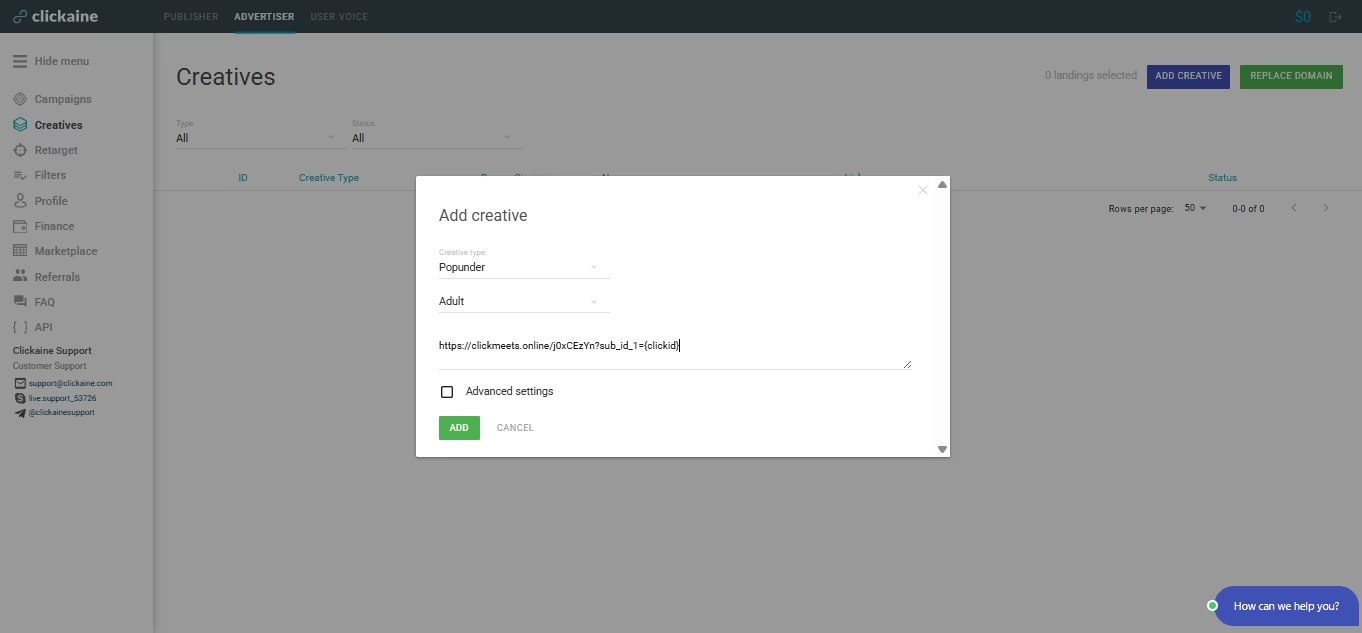
Creating a new creative in Clickaine: Popunder format, Adult category, with the smartlink added and the {clickid} token properly integrated for tracking.
Step 4: Moderation and account funding
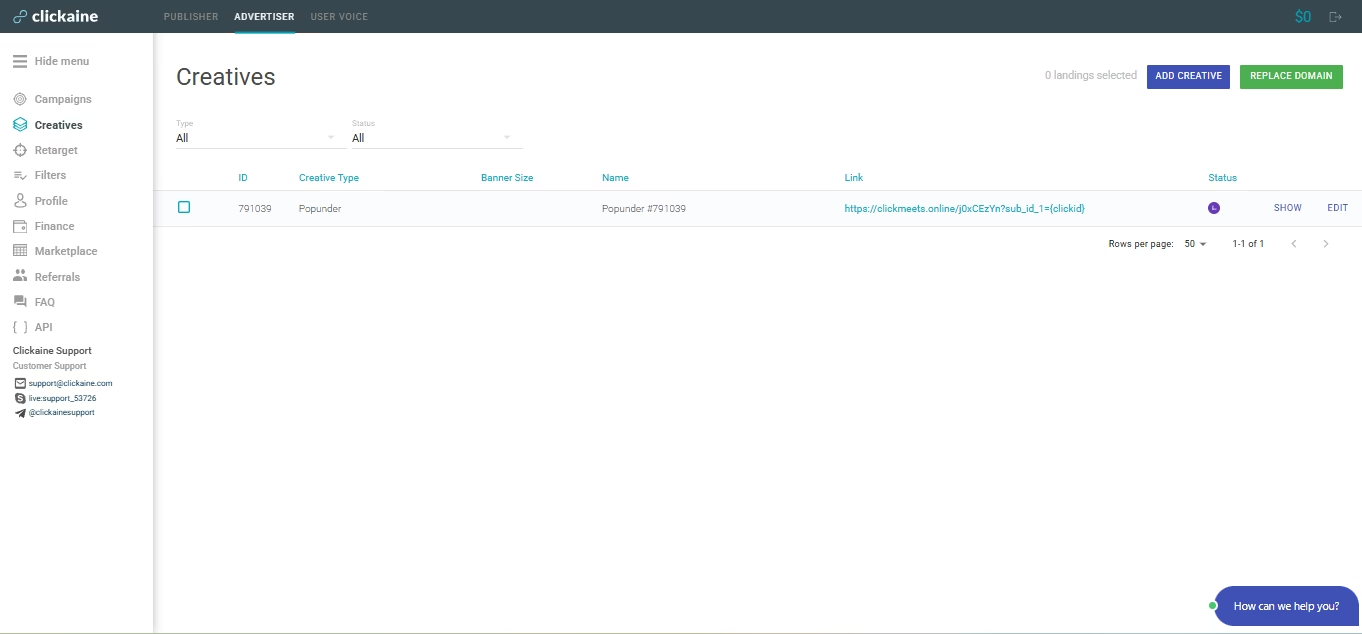
After submitting the creative, its status changed to “Pending”, which means it was under review by the moderation team.
The approval process didn’t take long. Within a few minutes, the status switched to “Active”, confirming that everything met the platform’s requirements.
Once the creative was approved, the only remaining steps were to create the campaign itself and fund the account balance. After that, traffic could be launched immediately.
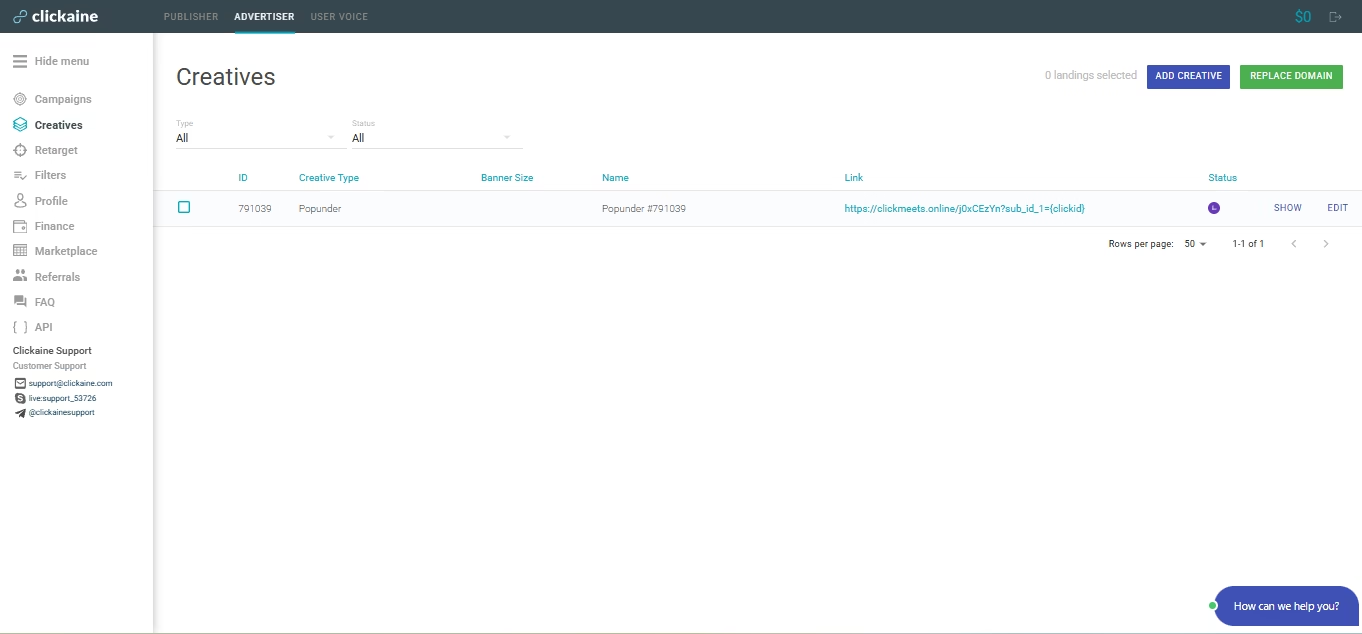
Creative #791039 in Clickaine — status set to “Pending” while awaiting moderation; once approved, the campaign becomes eligible for launch.
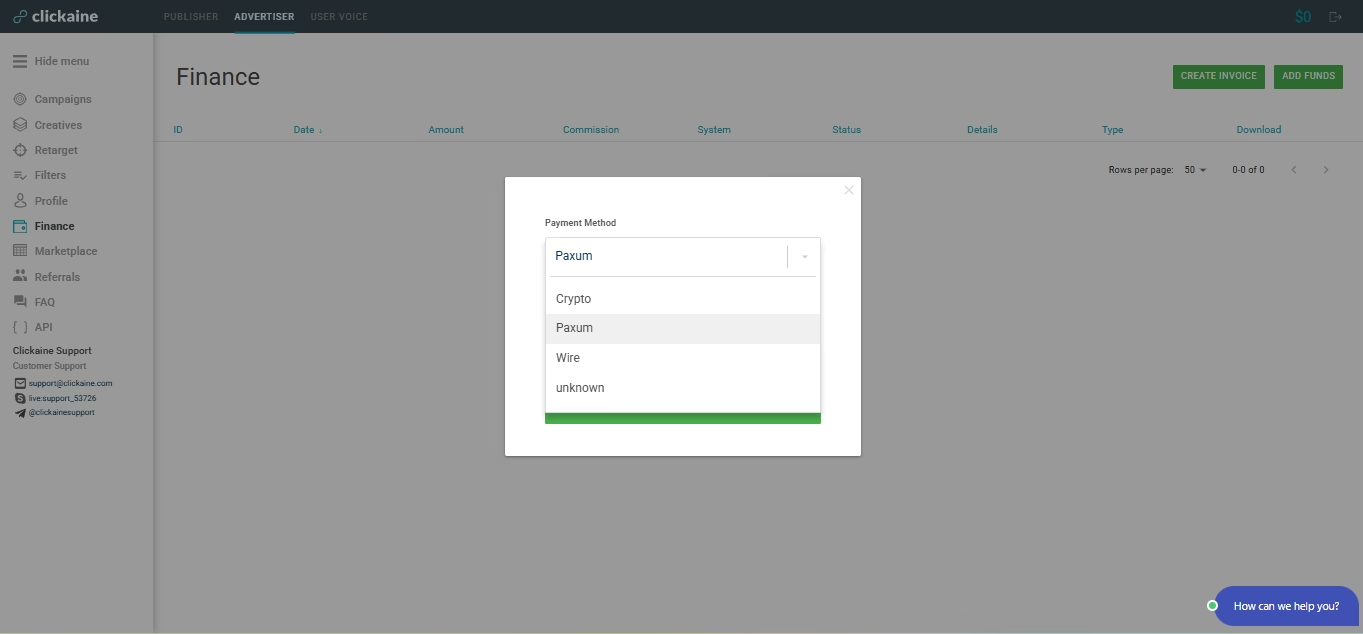
Available methods for funding the account balance in Clickaine.
H3 Creating a campaign in Clickaine
With the smartlink and creative ready, the next step was launching the actual campaign.
Step 5: Campaign setup — general settings
I created a new campaign called “Dating Smartlink 9117.”
For the main configuration, I chose the following settings:
- Site Type: All
- Site Category: Adult
- Bidding Model: Smart Bidding
- Initial Bid: $0.20 CPM
- Daily Budget: $20
I kept the setup simple on purpose. Since this was an initial test, the goal wasn’t aggressive scaling but collecting clean data and evaluating how the traffic would perform.
Once these basic parameters were defined, the campaign was ready for further targeting and launch.
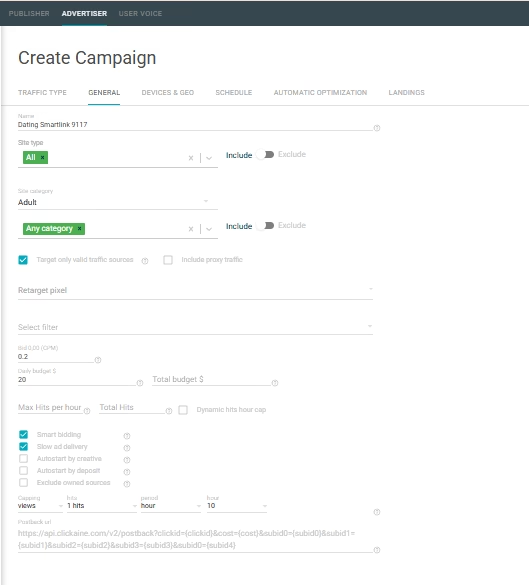
Campaign configuration in Clickaine — “General” tab, where the site type, category, bid, daily budget, and postback settings were defined.
Step 6: Targeting setup — devices & GEO
Next, I moved to the Devices & GEO section to define the targeting parameters.
For this campaign, I selected the following:
- GEOs: US, UK, DE, CA, AU, AT, CH, NL, BE, NO, FI, DK
- Device Type: Mobile
- Operating System: Android 10+
- Browser: All
- Language: English (as recommended by CPA.house)
The focus was on high-income, English-friendly markets with strong historical performance in the adult niche. I narrowed the traffic to mobile Android devices to keep the test structured and avoid spreading the budget too thin during the initial phase.
With targeting configured, the campaign was almost ready to launch.
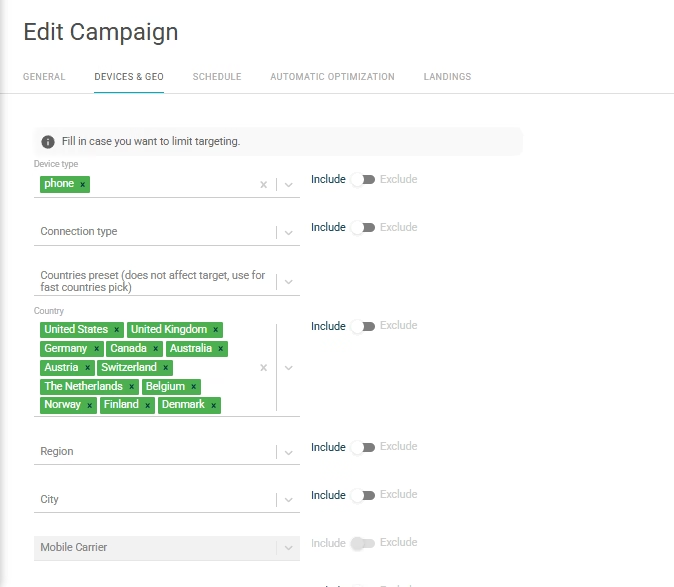
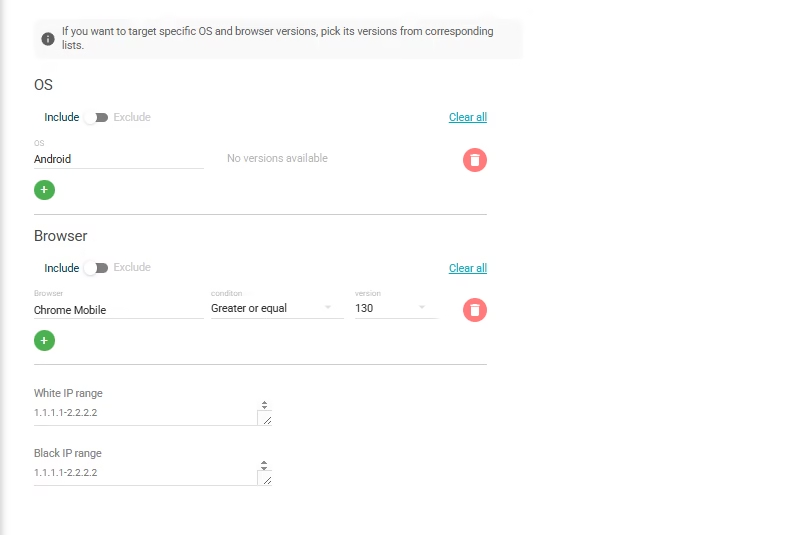
Campaign targeting in Clickaine: 12 selected GEOs, mobile traffic only, targeting Android devices version 10 and higher.
Step 7: Linking the creative — landings
In the Landings tab, I selected the creative I had created earlier — #791039 — and attached it to the campaign.
After double-checking the settings, I saved everything and launched the campaign.
At that point, the traffic was live, and the testing phase officially began.
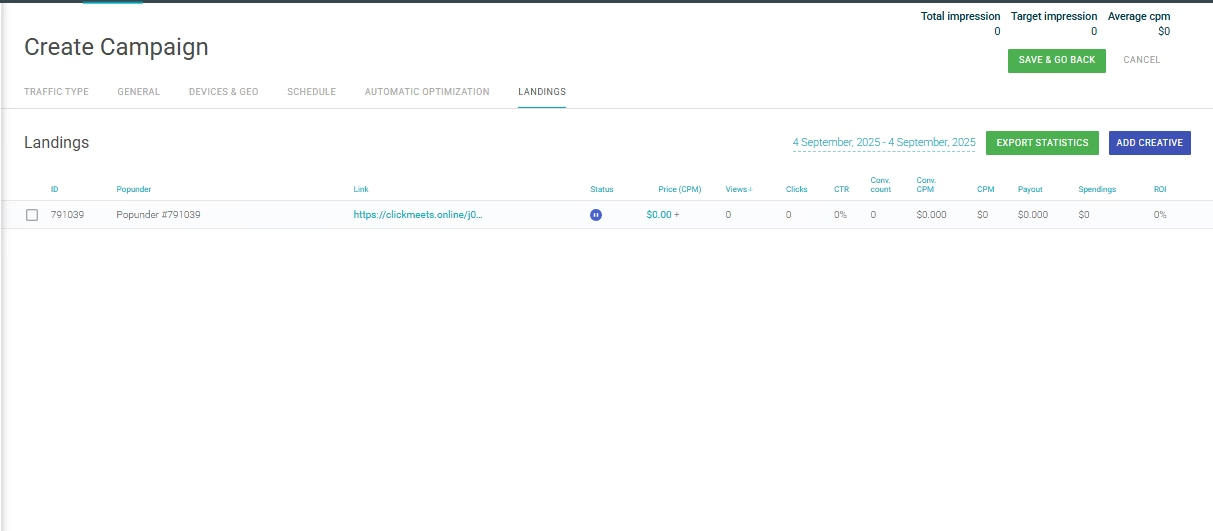
Linking the creative to the campaign: selected Popunder #791039, using the smartlink with the {clickid} token for tracking.
Stage 1: Raw traffic launch and early losses
The first version of the campaign went live on September 5.
Initial setup:
- Targeting: All 12 GEOs
- Devices: Mobile, Android 10+
- CPM: $0.20
- Daily Budget: $50
- Frequency Cap: 1 unique impression per user every 10 hours
- Funnel: Direct-to-smartlink (no pre-lander)
This was intentionally a “raw” traffic run. No heavy filtering, no micro-optimization — just clean data collection.
The first few days weren’t encouraging. ROI dropped to around –80%.
The reasons were pretty clear:
- Large volume of non-converting traffic
- Weak performance from several GEOs
- No source-level filtering yet
However, even during this loss phase, useful signals started to appear.
Four GEOs — US, UK, CA, and DE — were already responsible for the majority of conversions and revenue. Despite the overall negative ROI, these markets showed early signs of viability.
That insight became the foundation for the next optimization stage.
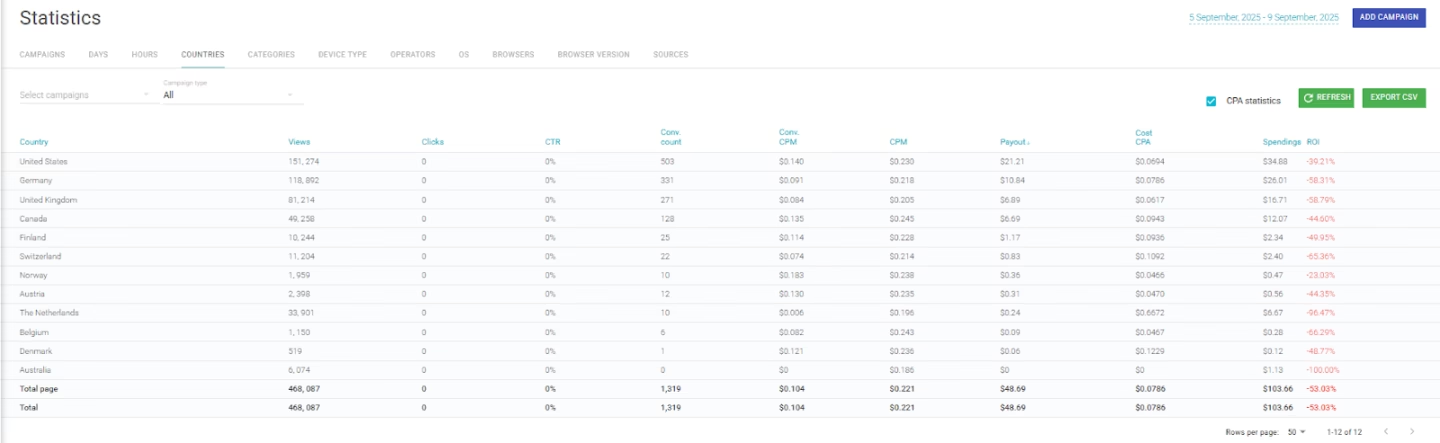
Statistics: September 5 - 9
Stage 2: Daily optimization and performance shift
- Starting September 8–9, I worked closely with the Clickaine account manager to move from raw testing into structured optimization.
- Here’s what we adjusted:
- ✅ Whitelisting publishers and zones — We kept only the placements that had already shown confirmed conversions and paused the rest.
✅ CPM increase to $0.40 — This helped secure higher-quality inventory and improved traffic consistency.
✅ Budget reallocation toward the top 4 GEOs — US, UK, CA, and DE became the priority markets, while the remaining GEOs were kept active with significantly reduced budgets.
✅ Frequency cap adjustment — Changed to 1 unique impression per user per day to balance reach and exposure. - The results shifted quickly.
- September 9: ROI improved to –20%
September 10: First profitable day, ROI +70%
September 11–24: Stable profitability with an average ROI of +75.48% - What made the difference wasn’t a dramatic strategy change — it was disciplined filtering, smarter bidding, and focusing on the budget where the data clearly showed potential.
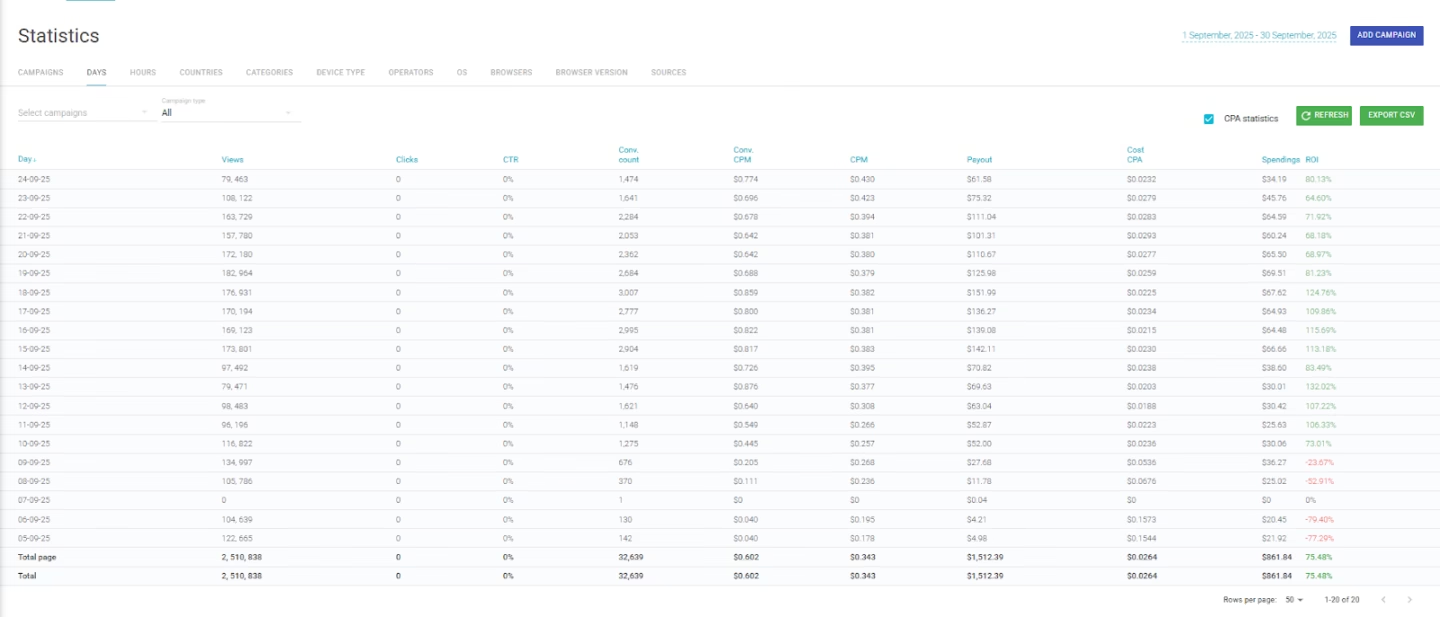
Statistics for all days
Optimization: publisher whitelist
After reviewing the data from the first three days, I worked together with the Clickaine manager to analyze performance at the publisher and zone level.
Based on confirmed conversions, we created a publisher whitelist, keeping only the sources that had already demonstrated positive signals. All underperforming or non-converting placements were excluded.
Once the whitelist was applied to the campaign, traffic quality improved noticeably. Conversion consistency increased, and wasted spend on low-performing inventory was significantly reduced.
This step played a key role in stabilizing ROI and preparing the campaign for profitable scaling.
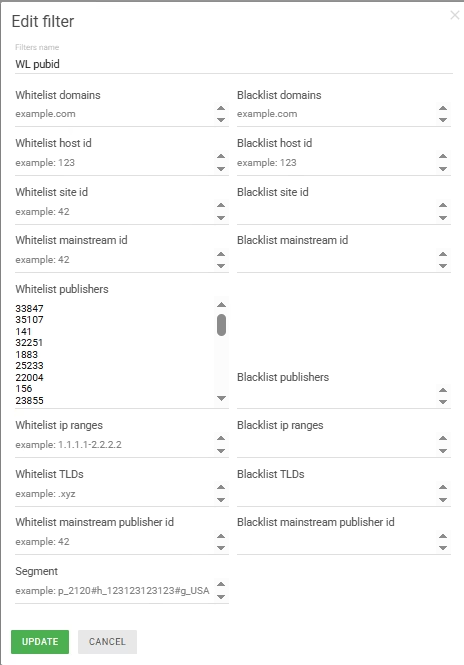
Publisher whitelist in Clickaine: a curated list of publisher IDs that delivered confirmed conversions. Excluding low-quality sources was a critical step in improving traffic quality and increasing overall ROI.
Final results: daily performance and GEO breakdown
After implementing the publisher whitelist and increasing the bid, the campaign transitioned into consistent profitability.
Daily performance
The daily statistics clearly show a turning point beginning on September 10. From that moment, ROI not only turned positive but continued to grow steadily.
Over the following days, the campaign reached peak returns of 132% and 124%, demonstrating that the optimization strategy was working and that the traffic quality had stabilized.
The shift from heavy early losses to sustained profit confirmed that structured filtering and focused budget allocation made the difference.
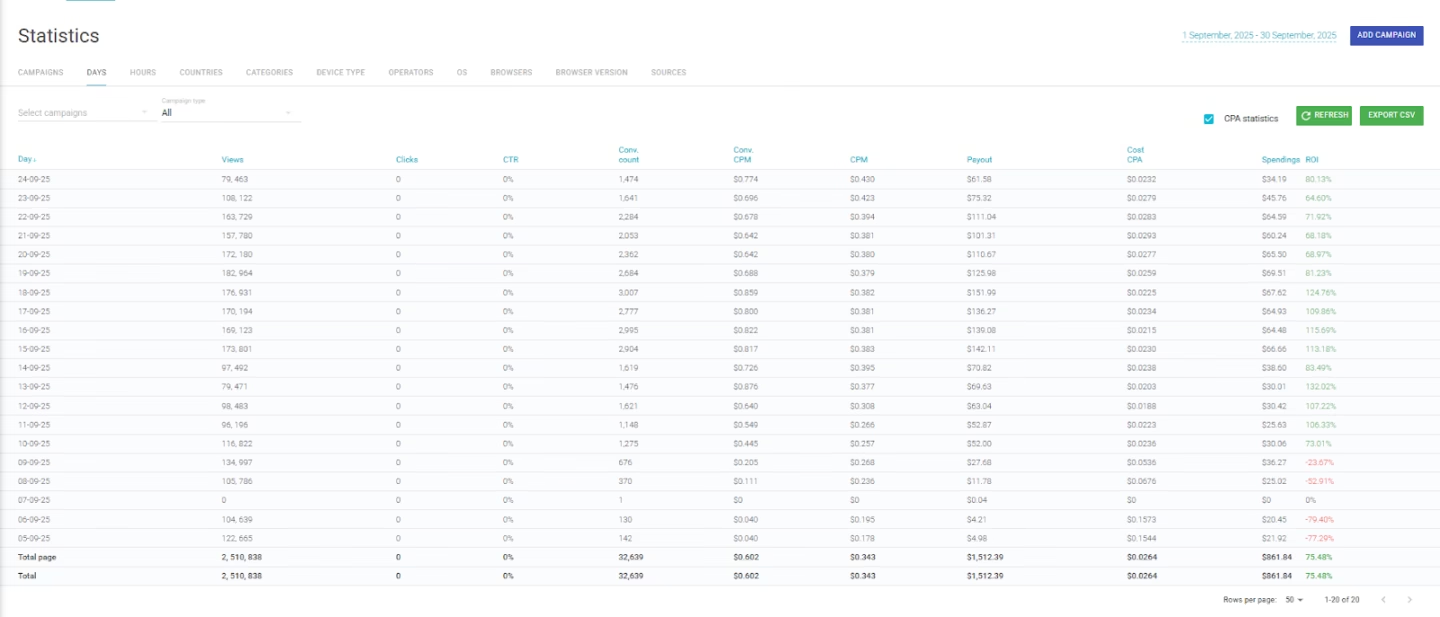
Campaign daily performance in Clickaine: starting September 10, ROI remained consistently positive, reaching peaks of up to 132%, with spend and revenue scaling proportionally.
Country-Level performance
The strongest performance came from the United States, the United Kingdom, Canada, and Germany.
These four GEOs were responsible for the majority of conversions and generated the main share of total profit throughout the campaign.
While other countries contributed smaller volumes, the data clearly showed that concentrating budget and optimization efforts on these core markets was the right decision.
The takeaway was simple: scaling works best when you double down on proven GEOs rather than spreading budgets too thin across mixed-performing regions.
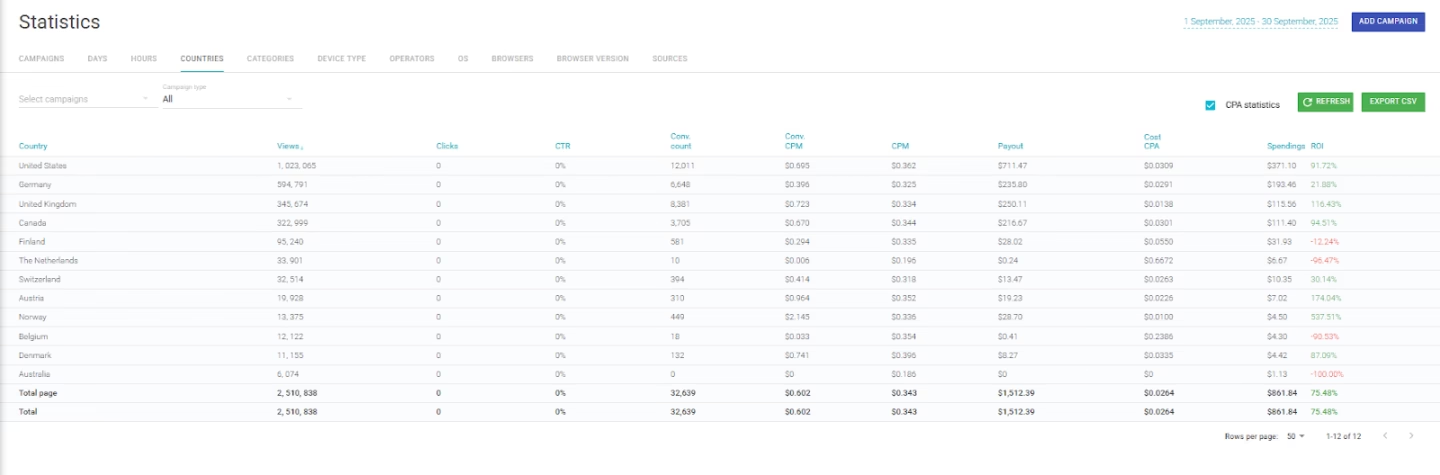
Country performance breakdown in Clickaine: top-performing GEOs were USA (ROI 91.72%), UK (116.43%), Canada (94.51%), and Germany (21.88%), driving the majority of overall profit.
Final results over 20 days
| Spend | $862 |
| Revenue | $1 512 |
| Profit | $650 |
| Average ROI | +75.48% |
| Top GEOs | US, UK, CA, DE |
I honestly didn’t expect to reach this level of profit within just 20 days — especially without complex pre-landers, cloaking, or advanced funnel tricks.
This test proved that a smartlink paired with high-quality popunder traffic from Clickaine can work effectively right from the start.
What impressed me most was the speed of optimization. In just a couple of hours, the account manager and I analyzed the data, built a publisher whitelist, and shifted the campaign from heavy losses into profit mode.
That kind of responsiveness makes a real difference when you’re testing paid traffic.
Why test popunder traffic on Clickaine?
Here’s what stood out during this campaign:
- Real-time support — the manager helped identify converting sources and compile a whitelist quickly
- Flexible targeting — GEO, OS, publishers, carriers, frequency caps, and more
- Strong mobile traffic in high-income GEOs
- Low entry barrier — minimum deposit starting from $20
- Transparent statistics — real-time reporting with no artificial delays
Ready to replicate these results?
If you’re looking to test popunder traffic with structured optimization and responsive support, Clickaine is worth trying.
Register, launch your first campaign, and start collecting real data today.